This map is meant to make it as easy as possible to look up information about parcels and structures.
Getting Information
To get information, do either of the following:
A) Click on a Parcel
It’s really that easy! Just click on a parcel in the map and the information panels will update.
B) Search for a Parcel
Use the Search Bar in the header, up at the top-left of the page. As you type, the search bar will auto-suggest possible matches based on what you enter.
You can search by: PIN (with or without hyphens!) and Site Address
Overlapping Parcels
If you’re trying to get information from parcels that overlap, like condominiums, you will need to use the select tool in the upper-right.
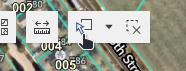
This tool lets you select multiple parcels at once, then page through the results.
Other Tips
The side panel can be re-sized by clicking and dragging divider bar. This can help adjust the app to your screen size.
Next to the search widget, you can click on the Basemap tool to change the map’s background.